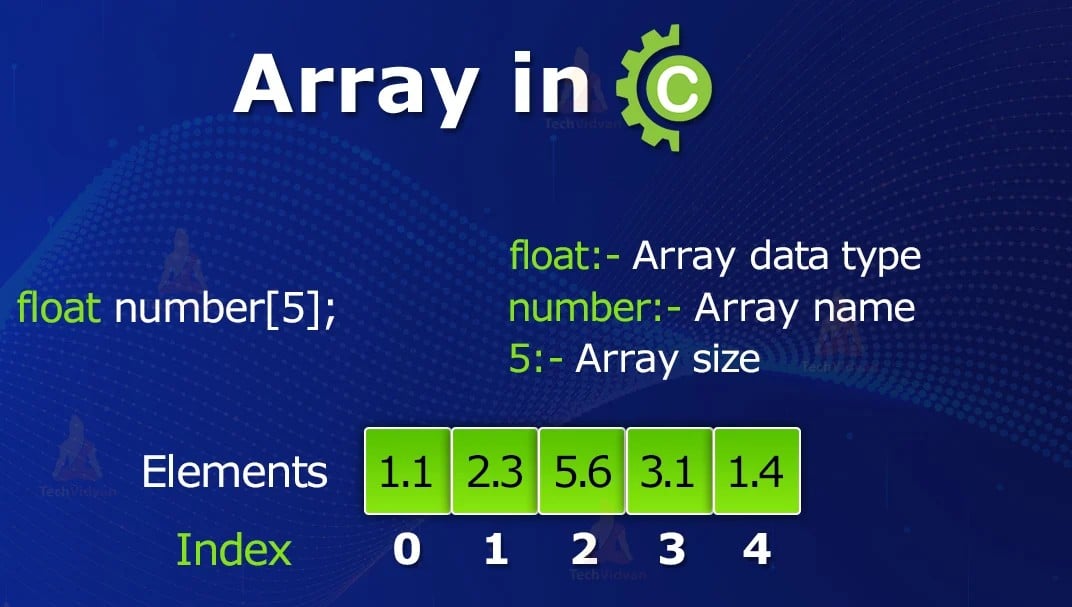
Data Structure & Alogrithm Lab

- What is an Array?
Array ek aisa data structure hai jisme same data type ke multiple elements ko ek hi naam ke under store kiya jata hai.
Example:
int a[5];
Iska matlab hai:
a→ array ka naamint→ data type ( Int, String, Boolean etc )[5]→ maximum 5 integer elements
Index → elements ko identify/access karne ke liye use hota hai.
C language mein index hamesha 0 se start hota hai.
| Element | Index | Reference |
|---|---|---|
| 1st | 0 | a[0] |
| 2nd | 1 | a[1] |
| 3rd | 2 | a[2] |
| 4th | 3 | a[3] |
| 5th | 4 | a[4] |
In simple Last index = Array Length − 1
Arrays Can Store Different Data Types
Array sirf int ka hi nahi hota. Different data types ke arrays bana sakte hain.
Integer Array
int marks[5];
Character Array
char name[20];
Float Array
float price[10];
Structure Array
struct Student students[50];
Lets do the code
#include <stdio.h> /*for Standard Input Output.*/

int main()
{
    int a[2] = {10, 20, 30};

    printf("First element = %d\n", a[0]); /*printf() → to display output*/
    printf("Second element = %d\n", a[1]);
    printf("Third element = %d\n", a[2]);

    return 0;
}
scanf() → to take input
printf() → to display output
- Array Declaration
int a[3] = {10, 20, 30};
This is the most important line for understanding arrays.
int
int
It means the array will store integer values.
a
a
This is the name of the array.
[3]
[3]
This means the array can store 3 elements.
{10, 20, 30}
These are the values stored inside the array.
So the array looks like this:
| Index | Value |
|---|---|
0 |
10 |
1 |
20 |
2 |
30 |
⚠️ Remember: Array indexing starts from 0.
⭐ Most Important Thing to Remember
If you write:
int a[3] = {10, 20, 30};
There are 3 elements, but the indexes are:
0, 1, 2
Not:
❌ 1, 2, 3
return 0;
return 0;
This tells the operating system:
The program finished successfully. ✅
0 generally indicates successful execution.
This is not the Link this shows that ur code how to visualize the code line by line if error comes its show also
https://programiz.pro/code-visualizer/c
Exam ke liye Important Points
Array is a collection of elements of the same data type.
Array elements ko index ke through access kiya jata hai.
C language mein array indexing 0 se start hoti hai.
Last index = length − 1.
int a[5]mein 5 elements store ho sakte hain.int a[5]ke valid indexes 0, 1, 2, 3, 4 hain.int b[5][6]ek two-dimensional array hai.b[5][6]mein total 30 elements ho sakte hain.2D array ka first element
b[0][0]hota hai.2D array ka last element
b[4][5]hota hai.Arrays
int,char,float,structure, etc. ke ho sakte hain.
🧠Easy Trick
C Array = Same Type + Same Name + Multiple Values + Index starts from 0
int a[5]

       0    1    2    3    4
      ↓    ↓    ↓    ↓    ↓
     [10] [20] [30] [40] [50]
a[0] = first element
a[4] = fifth/last element